



Have you recently watched an Instagram Reel you loved and want to find again? Unfortunately, Instagram doesn’t make it especially easy to locate Reels you’ve already watched, and whether you can find one depends on how you interacted with it. In this guide, we’ll cover the different ways you can track down recently viewed Reels on Instagram.
Can You Check Your Recently Watched Reels on Instagram?
Instagram currently doesn’t offer a dedicated feature for viewing a history of recently watched Reels. This means there’s no straightforward option in either the Instagram app or website to revisit every Reel you’ve recently seen. However, a few alternative methods can help you track down previously viewed Reels, although each method comes with certain limitations. Below, we’ll go through the available options.
Check the Instagram Reel From Your Reels Feed
Instagram usually keeps your current Reels feed in place until you close the app or log out of your account. If you haven’t done either since watching the Reel you want to find, you may still be able to locate it easily. Tap the Reels icon at the bottom of the screen and scroll back through a few videos to see if it appears.
If the Reels you watched earlier are no longer showing in the feed, Instagram may have refreshed the content after the app was closed. In that case, you’ll need to try one of the other methods below.
Find the Instagram Reel in Your Interactions History
If you liked or commented on the Reel you want to revisit, you may be able to find it through your Instagram interaction history. Instagram keeps track of recent activity such as likes, comments, tags, sticker responses, and other interactions with posts and Reels.
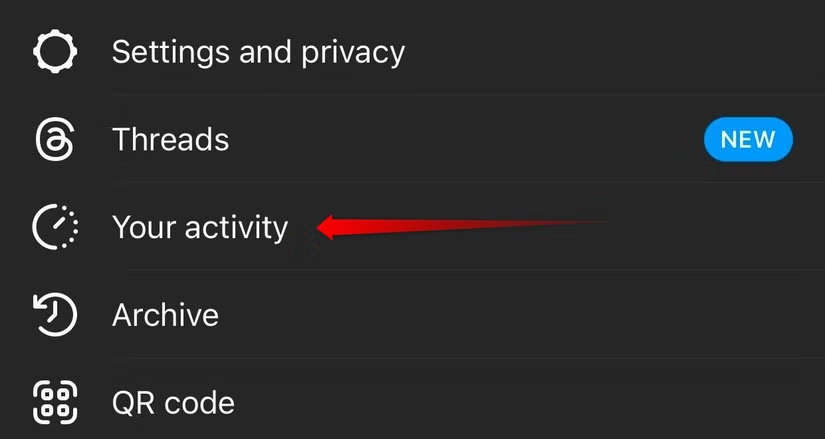
To view this activity, tap your profile icon in the bottom-right corner, open the three-line menu in the top-right corner, and select Your Activity.
In this section, review the different interaction categories to see the Reels you’ve previously engaged with. Check each one to find out whether the Reel you want to watch again appears there.
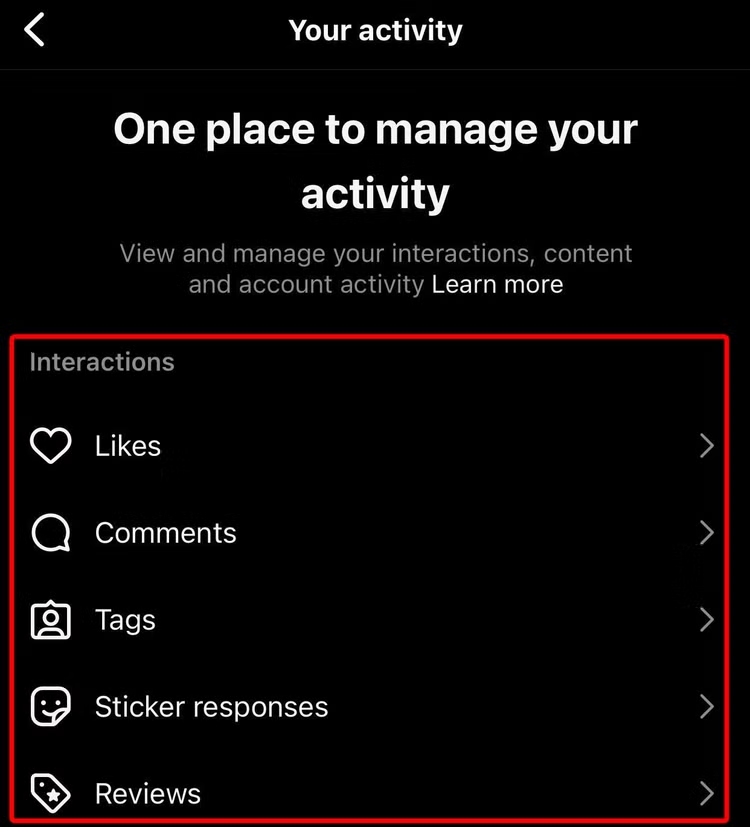
If it’s not here, you probably didn’t interact with it when you first watched it. So, move on to the next option.
Find the Instagram Account That Posted the Reel
If you remember the username, or even part of the username, of the account that shared the Reel, you can try finding it directly through Instagram search. Tap the magnifying glass icon, enter the username or any part you remember, and look through the suggested results.
Once you find the correct account, open its profile and go to the Reels tab. Browse through the posted Reels to see if the one you want to watch again is there.
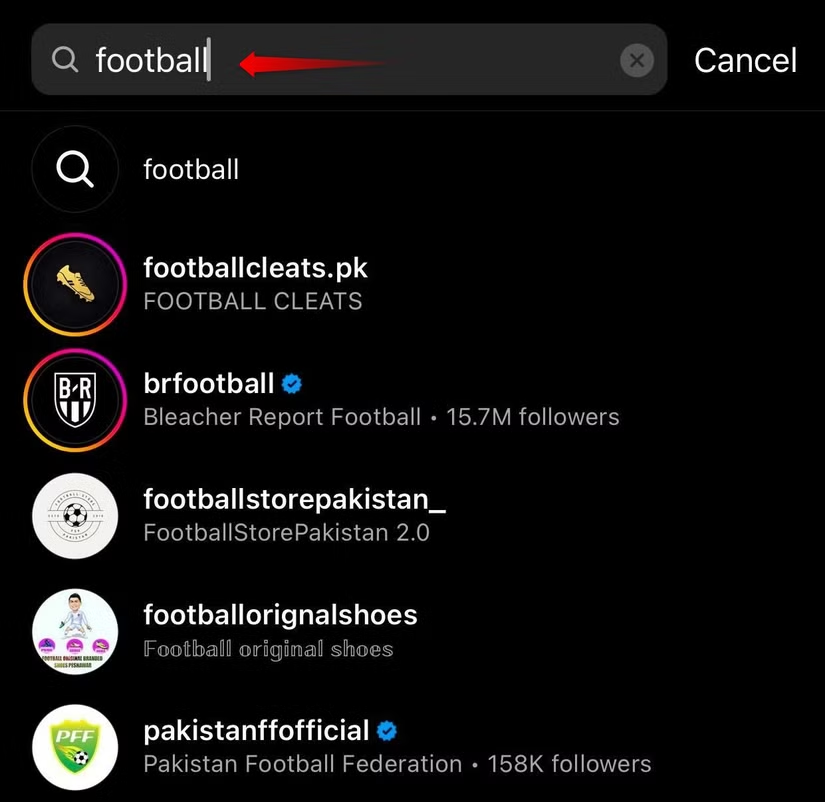
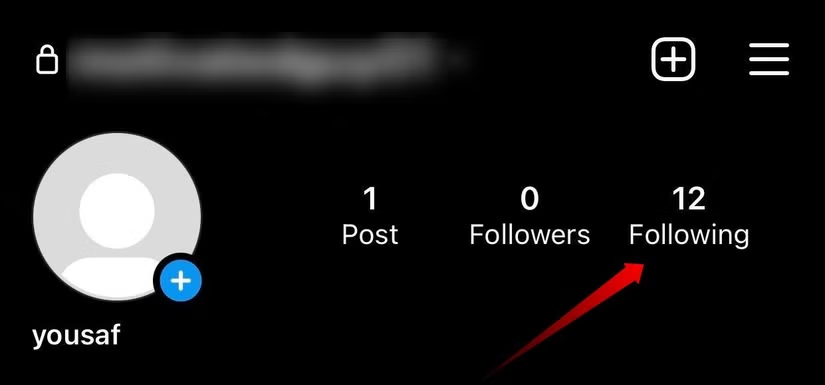
If searching doesn’t help, check whether you already follow the account. Open your profile, tap Following, and browse through the list of accounts. You may recognize the username or profile and be able to locate the Reel from there.
Manually Search for the Reel
If you remember any words from the Reel’s caption, hashtags, or the audio used in it, Instagram’s search feature may help you track it down. Tap the magnifying glass icon, enter any keywords, hashtags, or song details you can recall, and review the search results.
If you remember the music, open the Audio section and select the relevant song. You can then browse Reels that use the same audio and check whether the Reel you’re looking for appears among them.

If that doesn’t work, check the Tags and Reels sections as well. Browse results related to the hashtags or keywords you remember, as the Reel may appear there based on its caption or tags.
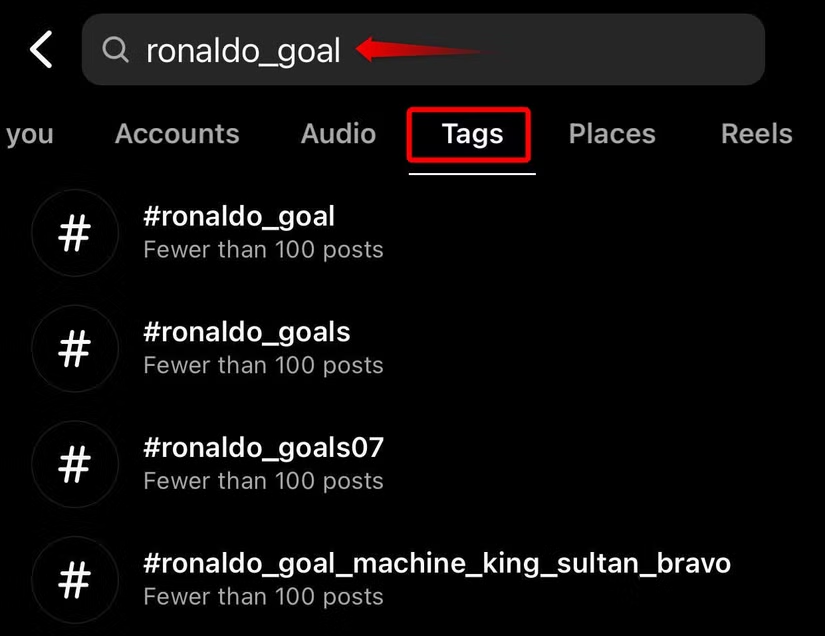
If none of these methods work, think about any other details you remember from the Reel, such as the creator, topic, caption, audio, or hashtags. Then, use those details to search for it through a web browser or search engine.
Download Your Instagram Account Data
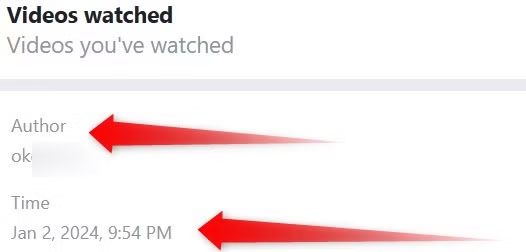
Instagram lets you request a copy of your account data, which may include information about Reels you’ve watched, such as the account name and the time you viewed them. You can use these details to help identify the Reel you’re trying to find. Keep in mind that Instagram may take up to 30 days to prepare your data for download.
Note: In our case, Instagram provided the download link within a few hours. It’s a good idea to check your email regularly after submitting the request.
To request your Instagram data, open the Instagram website and click More in the bottom-left corner. Select Your Activity, open the Download Your Information section, and click Continue. You’ll then be redirected to the Accounts Center.

Click Request a Download, then choose Complete Copy. Select the date range that includes the time you watched the Reel, enter the email address where you want to receive updates, and click Submit Request to continue.
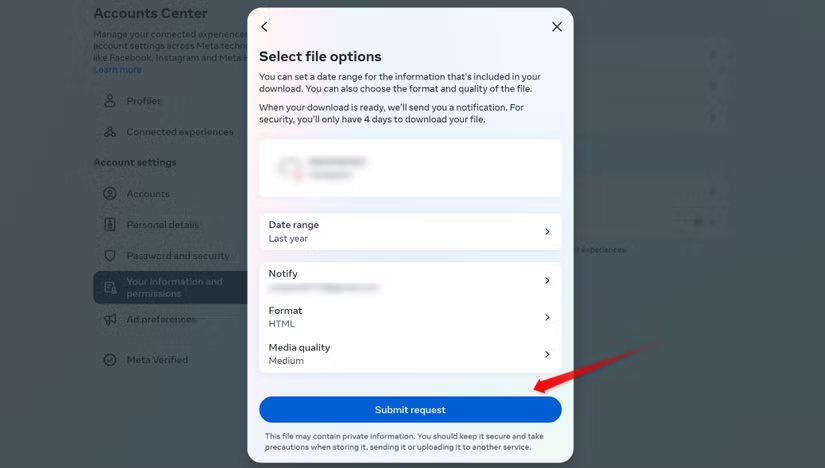
Instagram will send you an email once your requested data is ready. You can then return to the same section to download the available information.
To request your data from the Instagram app, tap your profile icon in the bottom-right corner, open the three-line menu in the top-right corner, and select Your Activity. Scroll down and tap Download Your Information.
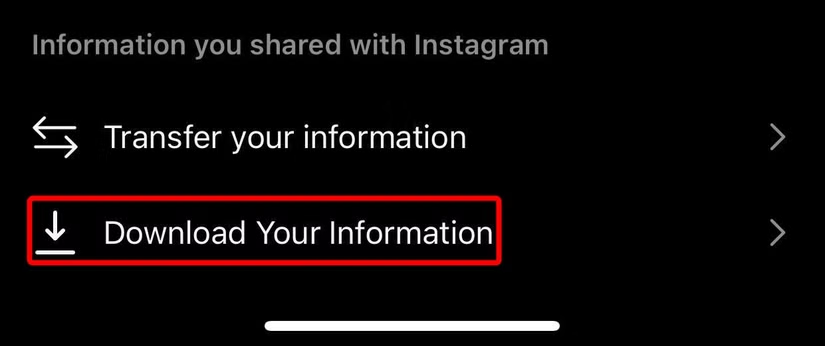

Inside the file, you’ll see a list of accounts that posted the videos and Reels you watched, along with the date and time each one was viewed. Use this information to visit the relevant accounts and browse their Reels. This can help you narrow down and locate the specific Reel you want to watch again.
How to Never Lose Your Favorite Reels Again
Hopefully, the methods above helped you find the Reel you were looking for. To make sure your favorite Reels are easier to find in the future, you can use a few simple options.
One way is to like the Reel or leave a comment on it. This adds the Reel to your interaction history, making it easier to locate later. You can also save the Reel for quicker access. Tap the three-dot menu on the Reel and select Save.
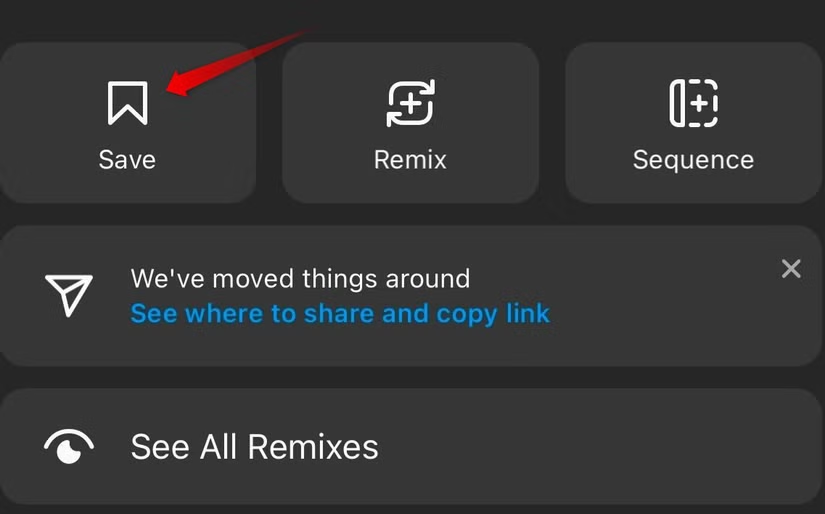
You can also copy the Reel’s link or share it with someone so you can easily access it later. Tap the three-dot menu on the Reel, then choose the option to share it or copy its link.
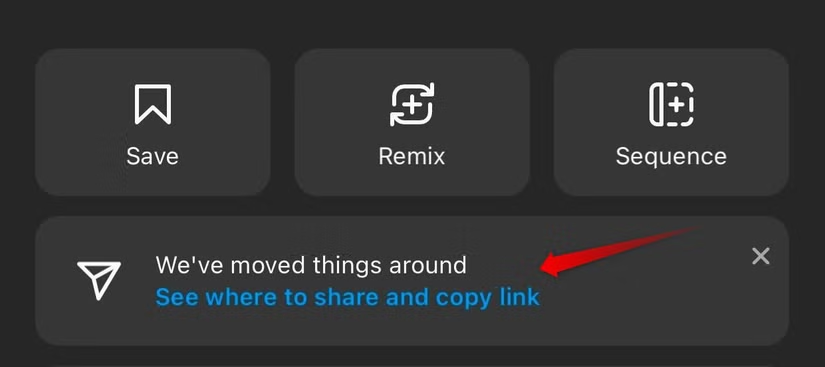
Tap Copy Link and save the URL somewhere convenient on your device so you can return to the Reel later. You can also send the Reel directly to a friend, which keeps it accessible in your chat history.
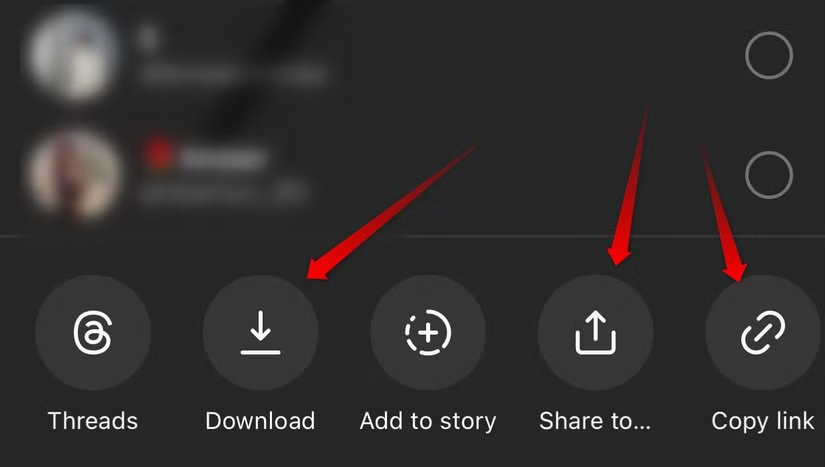
You can also download the Reel directly to your device. Tap Download, and the video will be saved to your camera roll, allowing you to watch it anytime, even when you’re offline.
Frequently Asked Questions
Can you see your recently watched Reels on Instagram?
Instagram does not currently offer a dedicated watch history for Reels. However, you may be able to find recently viewed Reels through your likes, comments, saved posts, search history, shared messages, or downloaded account data.
How can I find a Reel I watched but didn’t like?
If you did not like, comment on, save, or share the Reel, finding it can be difficult. You can try searching for keywords, hashtags, audio, the creator’s username, or other details you remember from the Reel.
Does Instagram have a Reel watch history?
Instagram does not provide a simple watch history section that lists every Reel you have viewed. Some viewing information may appear in your downloaded Instagram account data, but it is not as convenient as a regular watch history.
Can I find recently watched Reels through my activity?
You may find a Reel through Your Activity if you interacted with it. Reels you liked, commented on, or otherwise engaged with can sometimes be located through your interaction history.
Can I recover a Reel after refreshing Instagram?
Once the Reels feed refreshes, the same Reel may no longer appear in its previous position. You will usually need to search for it using the creator, audio, caption, hashtags, or your interaction history.
Can Instagram account data help me find watched Reels?
Your downloaded Instagram data may contain information related to videos you watched, including account names and viewing times. These details can help narrow down which account posted the Reel you are trying to find.
How can I avoid losing a Reel in the future?
The easiest options are to save the Reel, like it, leave a comment, copy its link, share it in a chat, or download it when the download option is available. These methods make it much easier to find the Reel again later.
Conclusion
Instagram does not currently provide a simple, dedicated list of recently watched Reels, but there are still several ways to find a Reel you viewed earlier. Checking your interactions, saved posts, search activity, followed accounts, shared chats, or downloaded account data can help you track it down.
To avoid losing interesting Reels in the future, consider saving, liking, sharing, or copying the link as soon as you find something worth revisiting. These small steps can make it much easier to access your favorite Reels later.
